Figures That SurviveReviewer Two
Describe the figure, sketch it, or just upload the paper. About thirty seconds later you have a publication-ready draft — and every label, arrow, and shape is still yours to change.
FROM THE WORKSPACE
Watch a figure come together.
A recorded session: the prompt goes in, the draft appears, and the labels, arrows, and colours are adjusted directly on the canvas — no regeneration between edits.
START FROM ANYTHING
Three ways in. One editable figure out.
Type it, draw it, or hand over the manuscript. PaperPict works from what you mean, not just what the pixels look like.
Text to figure
Write the mechanism, workflow, or result in plain language. PaperPict lays out entities, arrows, and labels using scientific illustration conventions.
Learn more →Image to figure
Photograph a whiteboard or upload a napkin sketch. The rough drawing becomes clean vector artwork with consistent line weights and alignment.
Learn more →Reference to figure
Upload the abstract or the entire paper PDF. PaperPict extracts the argument and drafts a graphical abstract, mechanism diagram, or poster.
Learn more →STILL EDITABLE
Fix the label. Don't regenerate the image.
Go ahead and try it. Change the journal palette, rewrite the label, swap the arrow, strip the background. This is a real editable figure, the same kind you'd export.
JOURNAL PALETTE
LIVE TEXT LABEL
ARROW
BACKGROUND
REAL OUTPUT
Generated by PaperPict. Edited by a person.
Two figures straight from the pipeline — a five-step mechanism diagram and a single-panel graphical abstract — each with every label, callout, and colour still live.
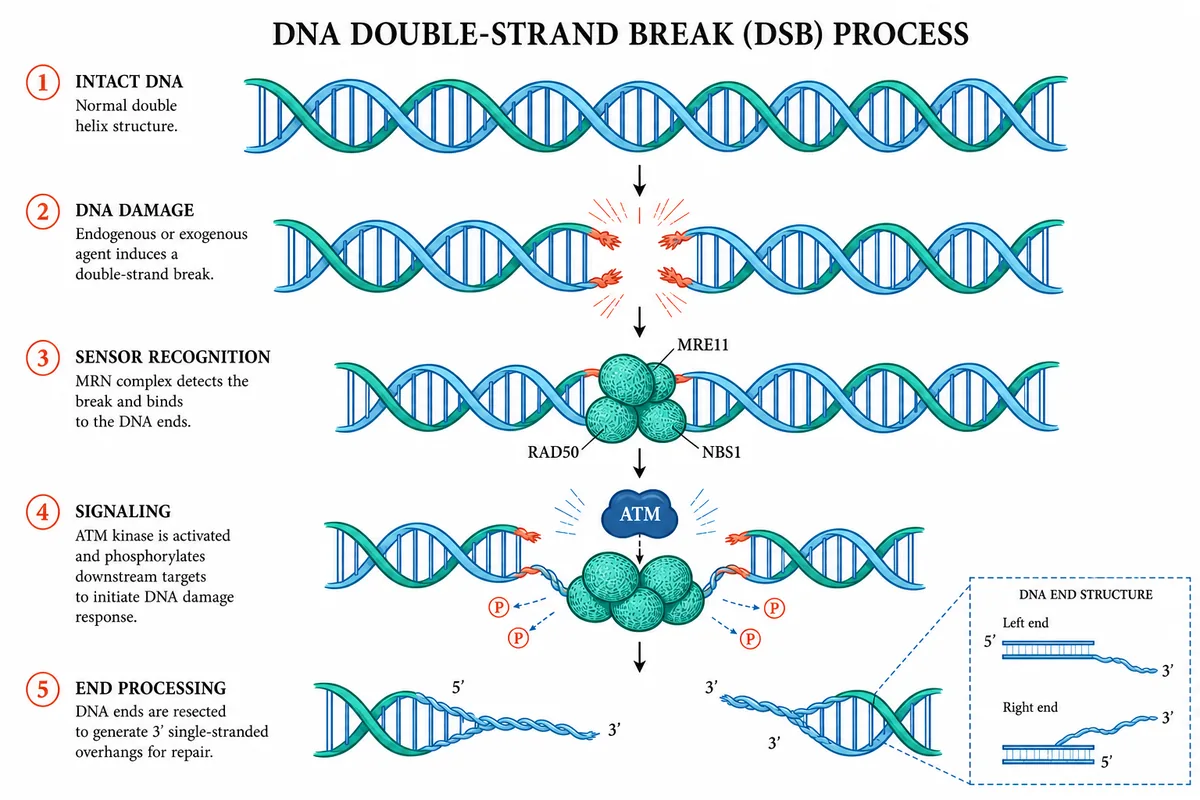
A numbered mechanism from one paragraph
This figure was generated from a short description of the DNA damage response and then recoloured to a two-tone blue–green scheme in the editor. The step numbers, the MRE11 / RAD50 / NBS1 callouts, the phosphorylation markers, and the "DNA end structure" inset are all separate objects.
Because the helix segments are grouped paths, changing the palette or moving the ATM node does not disturb the arrows or the labels beside them. The whole figure exports as a layered SVG or an editable PPTX.
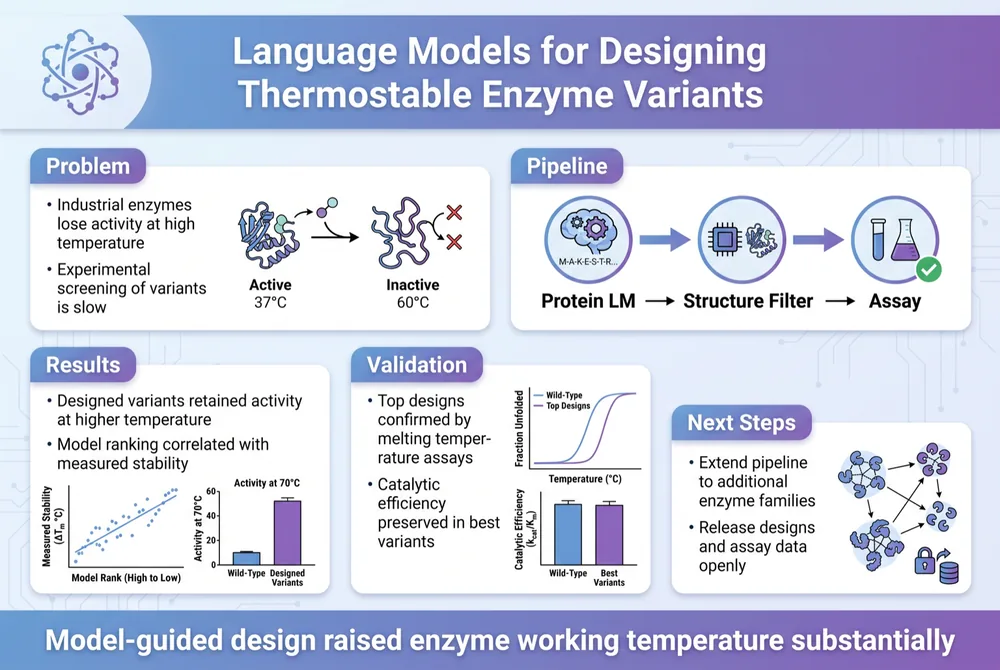
A graphical abstract from the paper itself
Uploaded PDF in, single-panel summary out. PaperPict extracted the problem, pipeline, results, validation, and next steps, arranged them into titled panels with a header and a one-line conclusion, and added small charts drawn from the paper's own figures.
Each panel is a container: retitle "Validation", swap the plot, or drop the "Next Steps" block and the layout reflows. The abstract was exported at the journal's requested pixel size.
CONVENTIONS, BUILT IN
The model already knows what a figure is.
Image generators draw pictures of science. PaperPict draws the science itself — the arrowheads, panel letters, legends, and line weights a journal's production team expects to see.
Activation arrows
Solid line, filled head. Drawn the same way in every panel and every figure of the project.
Inhibition bars
Flat-ended, heavier stroke, never confused with a missing arrowhead.
Panel lettering
Lowercase bold for Nature-family titles, uppercase for others — switched for the whole figure at once.
Legends and palettes
One shared legend per figure and a journal palette that stays consistent from Fig. 1 to the graphical abstract.
IMAGE TO FIGURE
The whiteboard photo becomes the figure.
Photograph the sketch from the lab meeting. PaperPict redraws it as clean vector artwork — consistent line weights, aligned nodes, correct symbols — and keeps every part editable. Read the sketch-to-figure guide.
- Rough shapes resolved into conventional icons
- Handwriting replaced by live, retypeable labels
- Arrows straightened, heads corrected, spacing equalised
Vectors, not screenshots.
Spend less time redrawing, more time writing. PaperPict keeps every figure as live objects — text, arrows, shapes, and panels — so a correction is an edit, not a regeneration. The master file is a layered SVG; PNG, JPG, and PPTX are rendered from it on demand.
What is a layered figure?
A figure in which each element sits in its own group: labels are real text, arrows are paths with proper heads, and panels are containers. You can select any of them in PaperPict, Illustrator, Inkscape, or PowerPoint and change it without disturbing the rest.
EXPORT, RECORDED
One source, four files.
The same figure exported as lossless PNG at 600 DPI, a JPG for drafts, a layered SVG for the vector editor, and an editable PPTX for the co-author who only has PowerPoint. The recording shows the export panel end to end.
- Column width and DPI chosen before export, not after
- Layered SVG keeps live text and one group per element
- PPTX opens with native shapes, not a pasted picture
IN NUMBERS
What the pipeline delivers.
OPENS EVERYWHERE
The file your co-authors can actually open.
Exports carry no lock-in. The layered SVG opens in Illustrator, Inkscape, and Affinity; the PPTX opens in PowerPoint, Keynote, and Google Slides. Nobody on the author list needs a PaperPict account to make a change.
WORKFLOW
Four steps from idea to submission.
The full pipeline is on the how-it-works page; this is the short version.
Describe or upload
A sentence, a sketch, the abstract, or the whole PDF. Choose mechanism, explainer, graphical abstract, or poster.
About 30 seconds
PaperPict lays out entities, arrows, and labels using scientific illustration conventions and your journal palette.
Correct in place
Retype a label, swap an arrow, recolour a region, regenerate one panel. Nothing else moves.
Every format
Layered SVG as master; 600+ DPI PNG for submission; editable PPTX for the talk and the co-authors.
SPECIALISED TOOLS
Built for the figures researchers actually make.
Graphical Abstract Maker
Single-panel visual summaries sized to journal specs, generated from your abstract and editable to the last label.
Learn more →Scientific Poster Maker
A0/A1 conference posters with a clear reading path, generated from a paper and exported as editable PPTX.
Learn more →Circuit Diagram Maker
Clean electrical, logic, and signalling schematics from a text description or a whiteboard photo.
Learn more →PRISMA Flow Diagram
PRISMA 2020 flow diagrams built from your screening numbers, with the standard boxes and arrows already in place.
Learn more →Phylogenetic Tree Maker
Rectangular, circular, or unrooted trees from Newick strings or species lists, styled for print.
Learn more →Mechanism Diagram Maker
Signalling pathways, reaction schemes, and multi-step mechanisms drawn in publication conventions.
Learn more →BY FIELD
Used across the sciences.
Each field has its own conventions. PaperPict applies them by default; see the use cases.
Life sciences
Signalling pathways, cell diagrams, CRISPR workflows, and experimental designs.
Learn more →Medicine and clinical research
Trial flow diagrams, patient pathways, anatomy schematics, and journal-styled figures for NEJM, Lancet, and JAMA.
Learn more →Chemistry and materials
Reaction schemes, synthesis workflows, characterisation panels, and TOC graphics.
Learn more →Engineering and computer science
System architectures, circuit schematics, pipelines, and algorithm overviews.
Learn more →Ecology and evolution
Phylogenies, food webs, sampling maps, and life-cycle diagrams.
Learn more →Teaching and science communication
Lecture slides, explainer figures, and outreach graphics that stay editable across semesters.
Learn more →COMPARE
A dedicated alternative to BioRender and general AI tools.
General image generators don't know what an inhibition arrow is. Template libraries don't know your paper. PaperPict sits in between: it draws with the conventions your field uses, and it lets you fix what it gets wrong.
| PaperPict | BioRender | General AI | |
|---|---|---|---|
| Generate from text / PDF | Yes | Manual | Yes |
| Editable after generation | Yes | Yes | Flat image |
| Layered SVG + PPTX | Yes | Limited | No |
| Journal palettes | Yes | Manual | No |
| Free to start | Yes | Limited | Varies |
IN PRACTICE
What changes when figures stay editable.
Reviewer 2 asked for the inhibition arrow to be dashed and two labels reworded. Both changes took under two minutes, and the resubmitted figure was pixel-identical everywhere else.
REVISION ROUND · MECHANISM FIGUREThe poster was drafted from the paper PDF, exported as PPTX, and three co-authors edited their own sections the same evening without a PaperPict account.
CONFERENCE POSTER · LAB PLANSwitching a five-figure manuscript from the default palette to Okabe-Ito before submission was a single setting, not a week of recolouring.
ACCESSIBILITY · JOURNAL PALETTEDATA
Unpublished work stays unpublished.
Manuscripts, sketches, and figures are processed to make your figure and nothing else. They are never used to train models, are isolated per job, encrypted in transit and at rest, and hosted in the EU. Full details on the security page.
No training
Your uploads never train a model.
Isolated jobs
Each generation runs alone.
Scheduled deletion
Sources removed 30 days after a figure is deleted.
Export any time
SVG, PPTX, PNG, JPG — even after cancelling.
PRICING
Free to start. Pay for credits when you need more.
FREE
Starter
For trying it on your next figure.
- 15 figure credits per month
- PNG and JPG export
- All journal palettes
- Basic editing
MOST POPULAR
Researcher
For people submitting this year.
- 200 figure credits per month
- Layered SVG and editable PPTX
- Up to 8K / 600+ DPI export
- PDF-to-figure and posters
TEAMS
Lab
For a group with a shared style.
- 1,000 shared credits
- Up to 10 seats
- Shared palettes and templates
- Priority generation
RESOURCES
Guides for better figures.
How to make a graphical abstract that editors actually use
A graphical abstract is read in five seconds. Here is how to earn those five seconds.
Read guide →Scientific figure requirements: what major journals ask for
Sizes, resolutions, fonts, and file formats for the publishers researchers submit to most.
Read guide →Colour-blind-safe scientific figures: a practical checklist
Roughly one in twelve men and one in two hundred women cannot reliably separate red from green. Your figure should still work for them.
Read guide →From whiteboard sketch to publication figure in one afternoon
A workflow for turning the drawing you made during a lab meeting into a figure you can submit.
Read guide →Conference poster design checklist
Twenty questions to answer before you send the file to the printer.
Read guide →The PRISMA 2020 flow diagram, explained box by box
What each number means, where reviewers look for mistakes, and how to make the arithmetic balance.
Read guide →QUESTIONS
Quick answers
Is the output really editable, or is it an image with layers?
Real objects: live text, vector paths, grouped shapes. Retype a label or drag an arrow without regenerating anything. Exports are layered SVG and native PPTX, not a bitmap in a container.
How is this different from BioRender?
BioRender is an icon library you assemble by hand. PaperPict generates the first draft from your text, sketch, or paper, and then lets you edit it. See the comparison.
Is my manuscript used to train models?
No. Uploads are processed only to create your figure and are deleted on a fixed schedule. See security and data.
What does it cost?
Free to start with monthly credits; Researcher and Lab plans add SVG/PPTX export, PDF input, and shared credits. See pricing.
Make your next figure in about 30 seconds.
Free to start. No credit card. Every element stays editable.